.svg)
.svg)
What is the ROI of IT help desk automation?


Listen to this blog as a podcast

.avif)
The ROI of IT help desk automation lies in faster resolution, not faster response. According to Fixify's 2026 IT Help Desk Benchmark Report, based on 50,000+ tickets across 30+ organizations over 14 months, the median resolution time for tickets assisted with AI automation was 4.4 hours. Without automation, the median is 71 hours. That's a 16x gap — and it's entirely downstream of the first response.
First response time is the same with or without automation
The median first response is 5 minutes regardless of automation level (and that's not the auto-reply).
A quick clarification on what "first response" means in this data, because the distinction matters. We're not talking about the automated acknowledgement where you send the "We've received your request and we’ll get back to you shortly" message. First response is the first substantive engagement where someone or something is actively working on the problem. Setting up an auto-reply that tells a user "I'm sorry your laptop is slow, we’ll look into this" isn't the same as actually diving in and troubleshooting the problem.
With that definition in mind: the median first response across the benchmark dataset is 5 minutes with AI automation and 4 minutes without. The difference isn’t statistically significant. If your help desk has competent triage, automation won't make pickup faster because it's already fast.
The 16x gap is in resolution, not response
Tickets assisted with AI automation resolve in 4.4 hours. Without automation, it takes 71 hours — nearly three full business days.
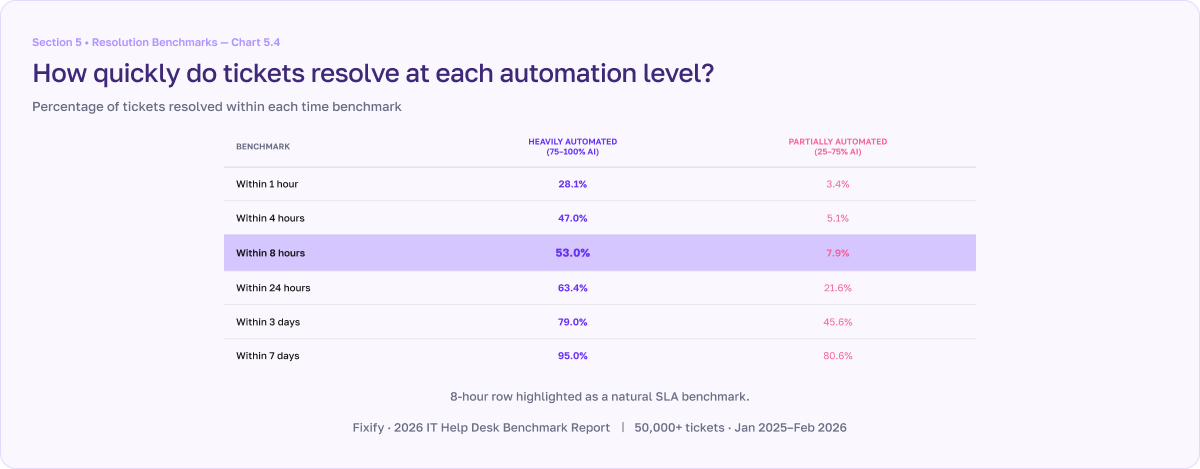
The resolution gap opens up almost immediately after triage. And it stays wide at every time benchmark. Within 4 hours, 48.9% of automated tickets are resolved. At that same mark, only 5.7% of non-automated tickets are done. In fact, it takes 3 full days for non-automated tickets to reach the completion rate that automated tickets achieve in 8 hours.
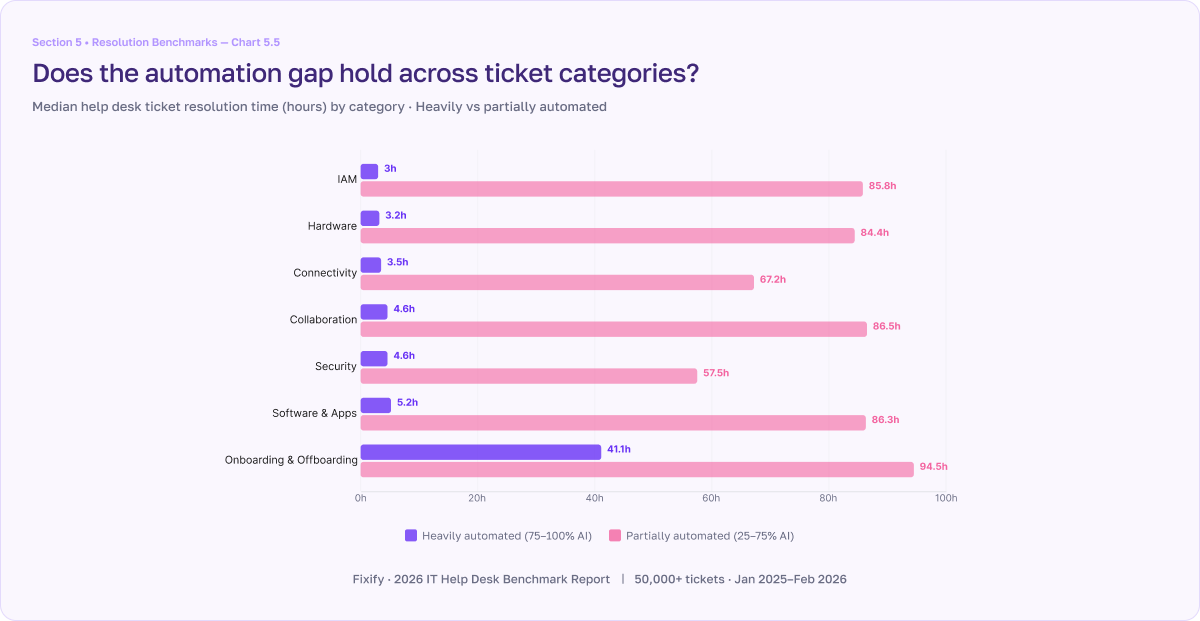
This resolution gap holds across every category. Identity and access management (IAM) tickets resolve in 2.9 hours with automation vs. 65.7 hours without. Hardware: 3.6 hours vs. 80.6 hours. Even onboarding and offboarding, which by their very nature are the slowest category because of the multi-step approvals and third-party coordination involved, drop from 81.8 hours to 32.1 hours when AI automation is thrown into the mix.
Where the time actually gets saved
Automation doesn't click faster. It eliminates the dead time between handoffs.
Think about how a typical multi-step ticket moves. It comes in, gets triaged, and then hits a dependency. Something requires approval. A vendor needs to respond. A security review needs to be completed. While that blocker is pending, the ticket just sits. When the blocker clears, a human agent has to notice, context-switch back to it, and pick up where they left off. That latency compounds across every handoff along the ticket's lifecycle.
Automation cuts that dead time. When the blocker clears, the automated workflow picks it back up immediately. No queue. No context-switching.
What slow resolution actually costs you
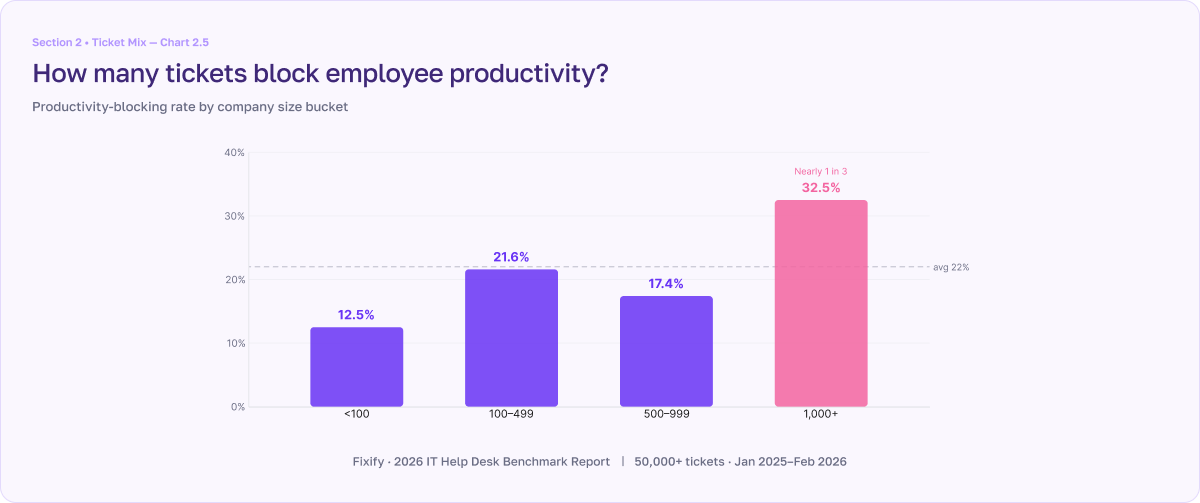
22% of tickets are productivity-blocking. At 71 hours median resolution, that's employees who can't work for days.
More than 1 in 5 help desk tickets represents a genuine work stoppage where an employee can't do their job (or some portion of their job) until the issue is resolved. For example, maybe the user is locked out of their computer or a customer support rep can’t get into the CRM. At enterprise scale (1,000+ employees), that rate climbs to 32.5%. When those tickets take three business days to resolve, the cost isn't just the IT team's time. It's the employee's lost output, the downstream delays, and the frustration that accumulates as employees try to self-service their own solutions with LLMs.
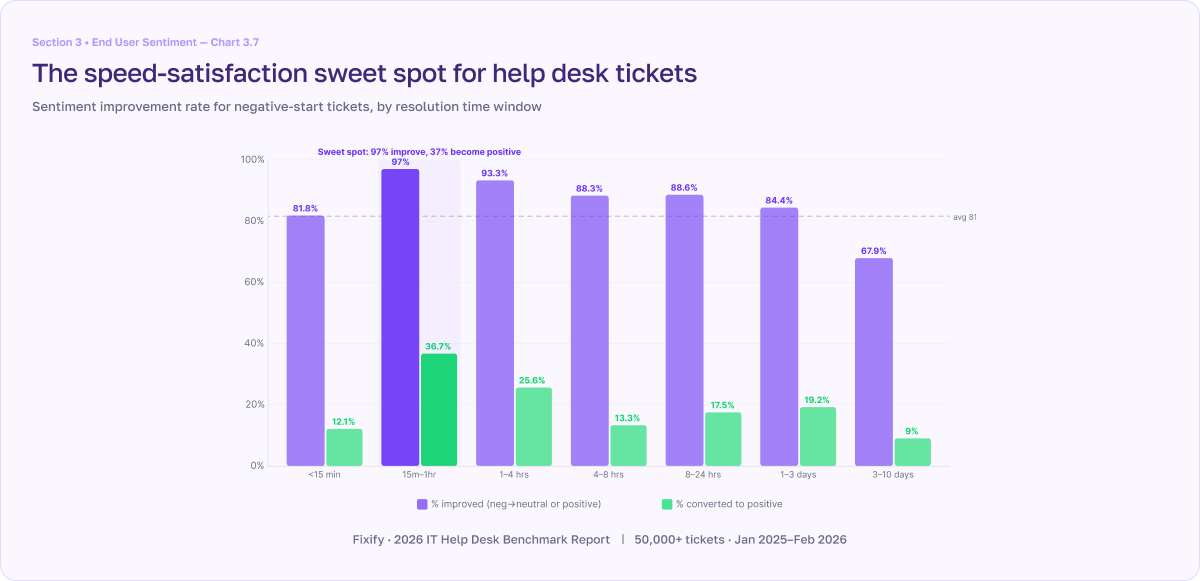
And frustration matters operationally, not just emotionally. The benchmark data shows that when tickets are resolved within 15 minutes to 4 hours, 93–97% of frustrated users leave more satisfied than they arrived. After 3 days, the conversion rate drops to 68%. Since the median resolution time for tickets supported with AI automation is 4.4 hours, they’re squarely in the high-conversion zone. The 71-hour median resolution time for non-automated tickets leaves them outside that sweet spot.
How to evaluate automation ROI
The first question most IT leaders ask about automation is "Will this help us respond faster?" The data says that's the wrong question. The first response is already pretty fast. In fact, it’s only 5 minutes, with or without automation.
A more revealing question is: "Will this help us resolve tickets faster — and how much is slow resolution costing us?" The cost shows up in four places:
- Lost IT team productivity for repetitive work that could easily be automated with AI tools
- Lost employee productivity on the 22% of tickets that create work stoppages
- Lost opportunity cost of work employees can’t complete when they hit productivity-blocking IT issues
- Declining user satisfaction, especially when resolution times stretch past 4 hours
| ROI category | Description | How to measure |
|---|---|---|
| Lost IT team productivity | A significant portion of repetitive tasks can be automated freeing up time of existing IT team | Cost per ticket |
| Lost employee productivity | 22% of IT tickets create some form of work stoppage, which means you are paying employees to sit idle | Cost of idle employees |
| Opportunity cost | Lost ROI on work or projects not completed while employees remain idle can be significant | Cost of work that is postponed or completed late |
| User satisfaction | Softer costs from employee frustration and erosion of IT’s internal brand | Increase/derease in user sentiment |
As the sophistication of AI tools increase so too will the ways we can measure and capture value. For now, though, these four items are a solid, defensible starting point.
One realistic note: automation delivers these results when it's maintained. Workflows that depend on specific team names, approval chains, or system configurations can break when those dependencies change. Building automation is the first step. Keeping it current is what sustains the ROI.
For the full resolution benchmarks by category, automation level, and use case, download Fixify's 2026 IT Help Desk Benchmark Report.
Related articles
.avif)
AI in ITSM: The honest challenges Fixify has seen

What is an IT support team structure? Roles and responsibilities explained


The best help desk software of 2026: How to choose the right solution for your team
Stay in the loop

Sign up to get notified about our latest news and blogs