.svg)
.svg)
How a 50-line workflow replaced our most fragile process

Listen to this blog as a podcast

.avif)
Claude in CI: When your build pipeline starts writing tickets
A customer was onboarding our Google Workspace integration. They'd followed the docs, granted the OAuth scopes listed, and connected everything. Then the integration errored on a new feature — archived user license visibility. Turns out, we'd shipped a PR that required a new OAuth scope. The engineer (me) was thinking about API response formats and error handling, not about what the onboarding doc says. Customer Success (CS) caught it reactively, but catching it reactively isn't a process — it's a side effect.
That was the last time it happened.
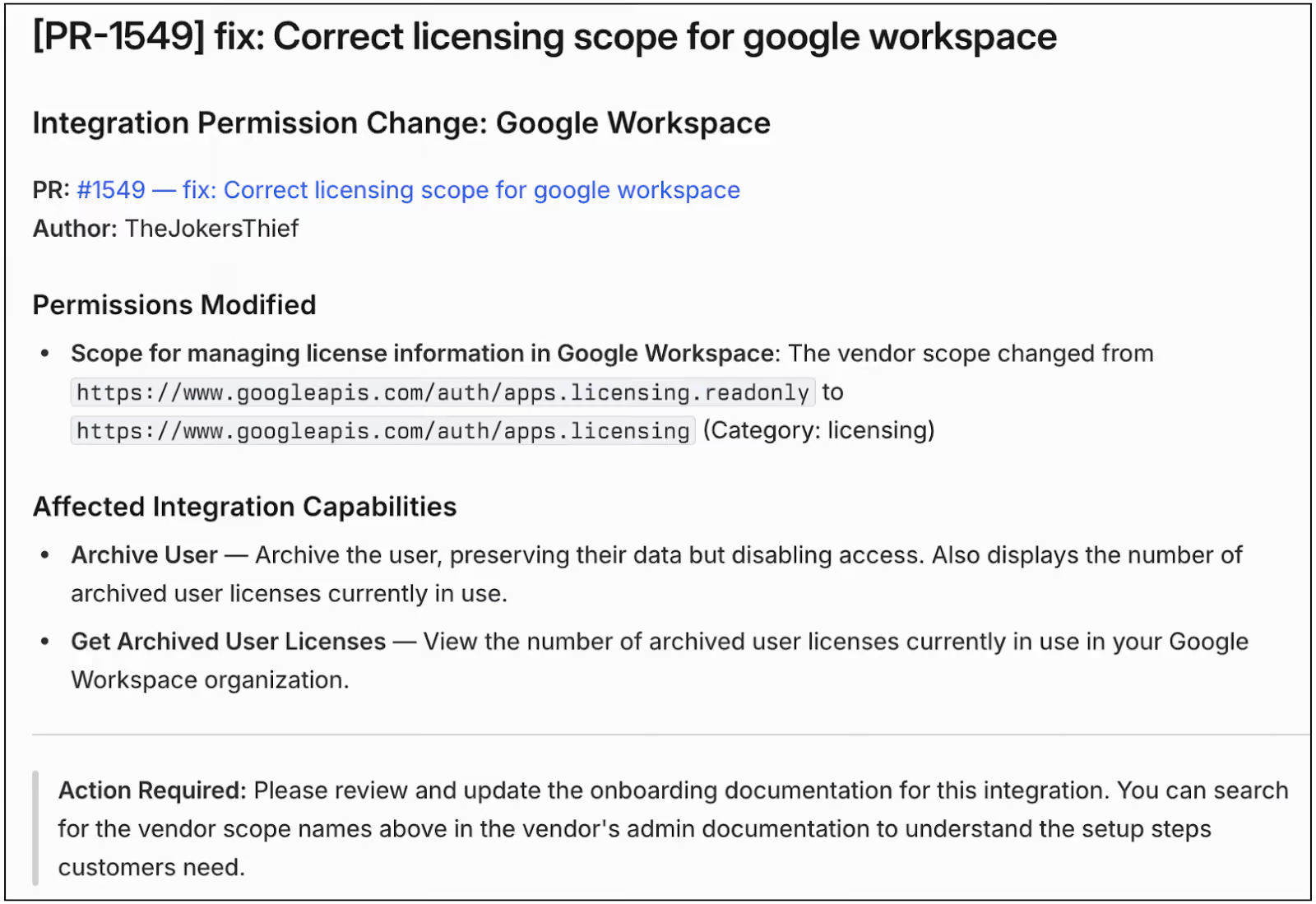
A few weeks later, a ticket showed up in our CS team's Linear queue: "Integration Permission Change: Google Workspace." It described, in plain English, that a vendor scope had widened from read-only to read-write, listed the two capabilities affected (Archive User and Get Archived User Licenses), and linked back to the pull request. It told CS exactly what onboarding documentation needed updating.
Nobody on the engineering team wrote it. Nobody on the CS team filed it. The ticket just appeared, correctly categorized, with all the information CS needed.
This post is about how we got there — not the AI, but the architecture that made it a 50-line workflow.
The gap nobody owned
We build integrations with all kinds of vendors. Each has its own permissions model, its own scope definitions, and its own health checks. Changes ship constantly — new capabilities, new API scopes, new validation checks.
Most of those changes don't warrant customer notification. A refactored HTTP client, updated backoff logic, new health checks — they just show up in the product, improving the overall experience. But some changes affect how and what customers configure. A new OAuth scope means a customer's admin needs to grant a new permission. Miss that, and the integration errors when it invokes that capability, which kicks off a cascade of escalations and fixes.
We'd been catching these through various checks. It worked, but it meant the gap between "engineer changes a scope" and "CS knows about it" could stretch. The scope change is line 47 of a 400-line PR. The engineer is focused on the integration, not onboarding docs.
It wasn't the AI
The thing that made this automation possible wasn't the AI. It was the architecture.
When we built Fixify's integration framework, the goal was consistency. A growing team maintains a growing number of integrations — you can't have every one structured differently. So we built an opinionated framework where every integration follows the same file layout:
manifest.ts— declares permissions (vendor API scopes), skills (API operations), health checks, permission groupsintegration.ts— registers everythingclient.ts— HTTP clientskills/— individual API operationschecks/— health validators
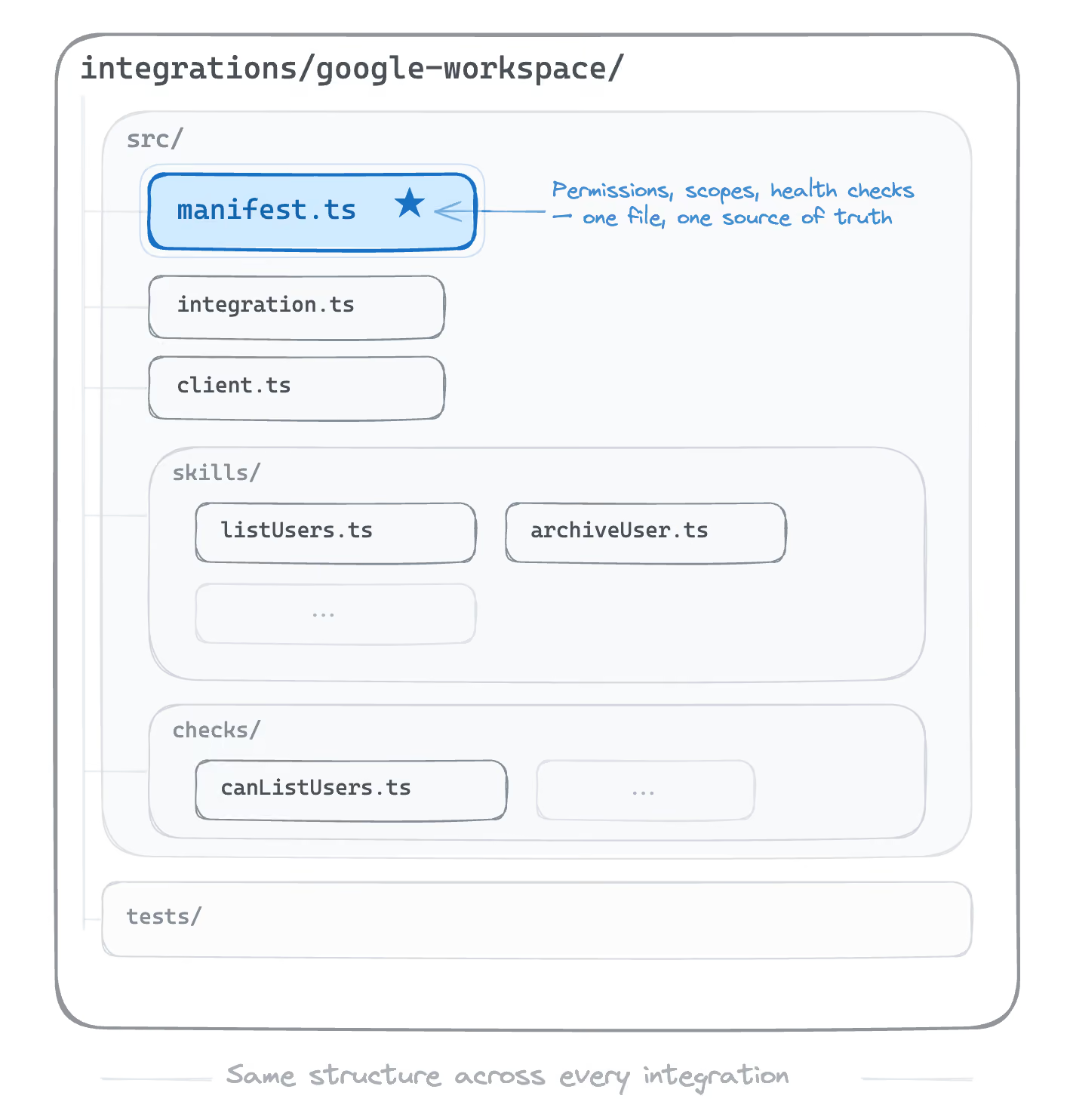
The manifest is the single source of truth. One file per integration where permissions live. If you want to know what OAuth scopes Google Workspace requires, you read manifest.ts. If you want to add a new scope, you modify manifest.ts. The framework enforces this — there's no other place to put it.
That predictability turns out to matter for more than just developer productivity. If there's only one file and one place where permissions can change, spotting scope changes becomes trivial.
We didn't design this for AI. We designed it so a new engineer could look at the Okta integration and transfer their understanding to other integrations, because they're structurally identical. But it turns out that optimizing for developer experience optimizes for machine comprehension too.
Wiring it up
The implementation lives in our GitHub Actions pipeline. Here's how it flows.
When a PR opens targeting main, a path filter checks whether any manifest.ts files have changed. Most PRs don't touch manifests — they're adding skills, fixing bugs, and updating clients. Those PRs skip this entirely. No cost, no noise.
If a manifest did change, the workflow checks for a label: has-sent-cs-notification. If the label exists, the PR was already processed. This is the deduplication mechanism — simple, visible, and it means re-running the workflow doesn't spam CS with duplicate tickets.
When the conditions pass, the pipeline triggers Anthropic's claude-code-action@v1 GitHub Action. Here's the core of the prompt (trimmed for clarity):
Your audience is the Customer Success team — they do NOT have GitHub access or code knowledge. Your output must be fully self-contained and human-readable.

Detect changes ONLY to the `permissions` and `permissionGroups` objects in manifest.ts files. Ignore ALL other changes.

ONLY report changes visible in the actual git diff.
Do NOT infer, guess, or hallucinate changes.

The audience needs to:

1. Understand WHICH integration changed
2. Know exactly WHAT vendor permissions/scopes changed
3. Understand in plain English what each permission allows
4. Know which integration capabilities are affected
5. Be able to Google the vendor scope name to learn more
6. Know WHO made the change so they can reach out
Two things worth noting about this prompt. First, it's narrowly scoped — permissions only, not the entire manifest diff. Claude ignores skill changes, health check changes, and client refactors. It focuses only on permissions. Second, it defines the audience explicitly. The output isn't for engineers — it's for CS. That framing matters. Without it, Claude writes a developer-facing summary. With it, you get vendor scope names and plain English descriptions.
The prompt also specifies a structured output schema so the response is machine-readable, not prose:
JSON
{
  "has_permission_changes": true,
  "linear_description": "Integration Permission Change: ...",
  "integrations_changed": ["google-workspace"]
}
(click to enlarge)
Three fields: a boolean gate, a CS-friendly writeup, and a list of affected integrations. Structured output means downstream automation doesn't have to parse free text. It's a clean contract.
If has_permission_changes is true, the workflow creates a Linear ticket in the CS team's queue and adds the has-sent-cs-notification label to the PR.
One detail I care about: the whole thing runs continue-on-error. It's a notification, not a gate. If it fails, the build still passes — the moment a CS awareness tool blocks a merge, engineers route around it and the system loses trust.
Predictable systems create affordances you didn't plan for
I keep coming back to three things when I think about why this worked.
- Well-designed systems for humans turn out to be well-designed systems for AI. We built the integration framework for consistency and developer productivity. The AI use was a side effect. If you design a system well, with clear boundaries and single sources of truth, automation finds the seams. The manifest convention that makes it easy for a new engineer to onboard is the same convention that makes it easy for a 50-line workflow to detect scope changes. The abstraction serves both.
- AI in CI doesn't have to be about code quality. The gap that hurt us most was cross-team communication. The hardest part wasn't writing the code. It was remembering to tell someone on a different team that the code mattered to them.
- The best processes are the ones nobody has to remember to follow. I’m still sitting with this one. We had a process before: "tell CS when scopes change." It worked when someone remembered. It failed silently when they didn't. The current system isn't smarter than a human. It's just present. It watches every PR – every time – and it doesn't get distracted by the API response format on line 47.
I think this pattern generalizes cleanly beyond integrations. Where information crosses a team boundary and the current process is "someone remembers." Those are the spots worth automating.
A special thanks to the people's SRE Evan Smith for help in getting this into practice, as well as those responsible for the framework, Dan Whalen and Derek Daly.
Related articles
What is vendor management in IT and why does it matter?


6 IT infrastructure solutions that won’t break the bank

.jpg)
Fixify benchmark report: How does your IT help desk measure up?
Stay in the loop

Sign up to get notified about our latest news and blogs