.svg)
.svg)
Fixify Application Management: Discover, define, and automate requests for every app in your organization


Listen to this blog as a podcast

.avif)
Ever opened that App_Inventory_FINAL_v3_updated_Oct.xlsx file and realized half the apps listed don't exist anymore, half of the owners have left the company, and nobody knows what "Approved by: TBD" actually means? At some point you start wondering when you hired Tobias D. Benedict — and why he’s apparently the sole approver of every application in the company.
Welcome to the app inventory junk drawer. Everyone has one. Nobody wants to open it in front of visitors.
It’s not your fault. You did the work. It's just that the old playbook — the spreadsheet, wiki page, or carefully maintained list — breaks down the moment you hit save. Someone leaves. A new app appears. An owner changes teams. Within weeks, your carefully crafted source of truth becomes fiction.
Meanwhile, app access requests keep piling up. Roughly 19% of all IT tickets we see are app-related — that's 2x more than any other request type. And it's not just volume. It's the manual scavenger hunt that these requests kick off. Who owns this app? Do they know they own this app? Does this person's role qualify? Is this the same app as that other thing with three different names?
The tools designed to inventory and tame shadow IT and app sprawl weren't built to help field access requests. Some focus on the apps they can see from SSO — which misses everything not in Okta (which in our experience is quite a lot). Others are built for finance and compliance teams to manage licenses or pass audits, not the daily operational reality of provisioning access.
But the real problem runs deeper: IT is expected to provision and manage access for apps they don't actually own. Marketing owns HubSpot. Sales owns Salesforce. Engineering owns GitHub. HR owns Workday. Yet when someone needs access, the ticket lands on IT's desk. You're managing tools across every department, often without knowing they exist until someone requests them. You own the pain, but not the apps.
Fixify Application Management is a living map of every app in your org. It discovers apps — including shadow IT, maps owners and approvals, and automates the access requests that eat your analysts' time.
What does Application Management do?
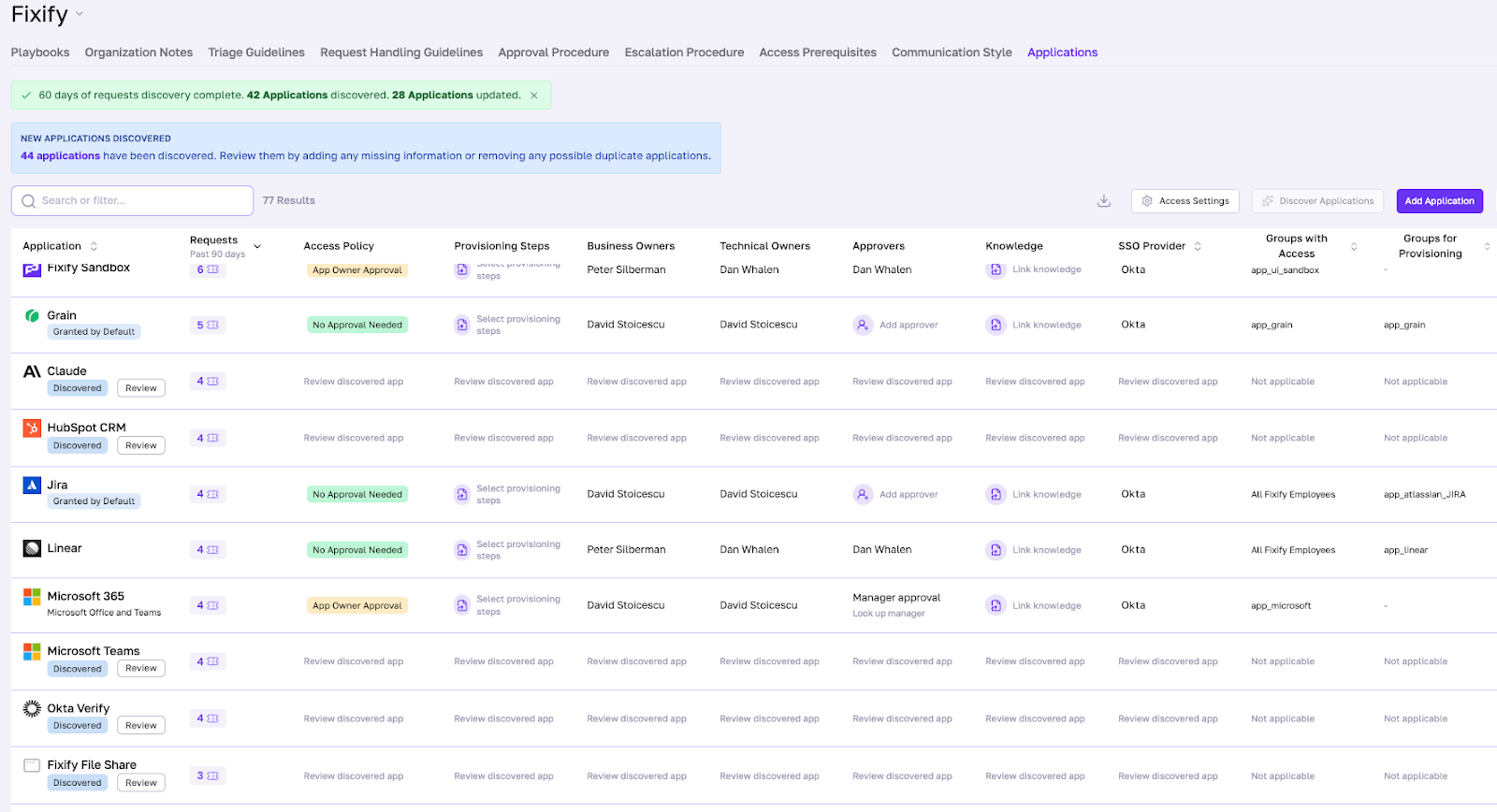
At the heart of Fixify Application Management is the Application Matrix (App Matrix). Think of it as your customer-specific control panel for access requests.
The App Matrix lists every known application in your environment, including:
- Business and technical owners
- Access policies
- Related ticket history
- SSO status and the groups that should have access
There are three steps to getting Application Management up and running.
Step 1: Discover
Fixify automatically discovers apps by examining your tickets for references to applications. Then it reviews apps connected to identity integrations like Okta, Google Workspace, and Entra ID (formerly Azure AD).
Shadow IT? Custom internal tools? They show up here too. If a user requests it in a ticket, Fixify adds it to your App Matrix. You can also manually add apps or have our Customer Success team bulk-import during onboarding.
The discovery happens continuously. As your environment changes — new apps appear, old ones disappear — the App Matrix updates automatically. No more asking ChatGPT at 10:30 PM how to refresh your stale inventory.
Step 2: Define
Once apps are discovered, IT teams set owners, approvers, approval policies, and provisioning steps for each app in the App Matrix. This is where you define the rules. You can use our defaults or customize them for each app:
- Standard access: Auto-approve for everyone (like Microsoft Teams or Slack for the whole company)
- App owner approval: Route to the business owner who actually manages that tool
- Manager approval: Require the requester's manager to sign off
- Lockdown: Flag sensitive apps (like AWS or GitHub) that require special handling
The App Matrix pulls approver names directly from Active Directory or Entra ID, so you're not typing them manually. It also verifies that approvers are still active employees before routing requests — no more pinging people who left three months ago.
This is where IT moves from “processor” to “conductor.” Instead of fielding every app request personally, you're defining the workflows once — then letting the system route, approve, and provision based on those rules, including which apps should be granted to all employees by default.
Step 3: Automate
When an app request comes in, Fixify analyzes it. If someone’s asking for access to an app, the request is mapped to the appropriate access policy and provisioning steps in the App Matrix. Fixify automatically checks the approver and approval type — and unlocks the relevant automated skills.
Our AI automations have the context they need at their virtual fingertips: who owns this app, what’s the approval workflow, which Okta groups should the user belong to, and what knowledge articles would be helpful to share. The boring stuff gets automated. The edge cases get flagged for human review.
And because the App Matrix is continuously updated, the automation is never working off stale data. The playbooks stay current. The workflows stay accurate. The tickets get resolved faster.
What's cool about Application Management
| Feature | What it means |
|---|---|
| Automatically discover apps — and keep them up to date | Fixify continuously monitors user requests and SSO data to keep your app list current, including custom apps and shadow IT. |
| Uncover shadow IT before it becomes a problem | If a user asks for an app that IT hasn't seen before, Fixify adds it to the App Matrix — giving you full visibility and control. |
| Get full visibility into your SaaS landscape | See every app, owner, approver, and playbook in one centralized view. Spot duplicate apps, optimize vendor spend, and become your CFO's new BFF. |
| Create standardized approval workflows | Define clear, repeatable processes for every app request so approvals, ownership, and automation stay consistent as your org scales. |
| Unlock automation with context | Mapping apps to playbooks unlocks automated skills that take boring work off your plate and helps analysts resolve high-volume requests in seconds — not hours. |
| See the total impact of each app | Track ticket volume by app across all request types (not just access). Use this data to negotiate better vendor contracts, identify training gaps, and reduce repeat tickets. |
Why it's harder than it looks
On the surface, "build an app inventory" sounds straightforward. In practice, it's anything but.
Here's what we had to solve:
Teaching AI to recognize "the same" app with 15 different names
Users don't speak in standardized app names. They say "O365," "Office 365," "Microsoft 365," "Excel," "Teams" — all referring to the same suite. Some call it "MS Office." Others just say "Word."
We built an LLM-powered deduplication layer that understands these variations and consolidates them into a single, clean app record. It's not just string matching — it's semantic understanding. The AI knows that "Slack" and "the messaging app" are the same thing in context.
The result: no more lists with 15 entries just for Office. Clean data from day one.
Discovering shadow IT and custom apps
Most tools only see what's connected to your IdP. But shadow IT doesn't live in Okta. It lives in ticket requests and Slack messages — places where people casually mention the tools they're actually using.
We focused our discovery engine on real IT tickets to recognize apps that wouldn't be in any public database, testing and validating it against custom applications in real world environments.
Custom internal tools. Industry-specific SaaS. That niche productivity app someone's team swears by. If it shows up in a ticket, we find it. And if our model isn't sure what it's looking at, it flags the app for human review rather than making a bad guess.
Keeping the App Matrix current without manual updates
Traditional app inventories go stale the moment you create them. Someone leaves. Ownership changes. New apps appear. Suddenly your carefully maintained spreadsheet is fiction.
We solved this by making the App Matrix self-updating. Every processed ticket, every Okta group sync, and every new request automatically refreshes the data. When ownership gaps appear — like an approver who's no longer with the company — we proactively flag them for review.
Balancing automation with security
For security-conscious organizations, giving a third party automation access to critical infrastructure is a non-starter. We get it. Our founders grew up in the security industry.
So we built layered controls:
- UI flags in the App Matrix that mark sensitive apps (like AWS or GitHub) as "lockdown" or "out of scope"
- Playbook restrictions that prevent automated workflows from touching those apps
- Okta resource sets that scope down which apps and groups Fixify can even see in your IdP
- Out-of-scope routing that automatically escalates restricted apps to the appropriate internal team
Multiple safety nets mean automation can run fast without running reckless. You can start with non-sensitive apps, build confidence, and expand from there.
Closing thoughts
When you don't know what apps exist, who owns them, or how to provision access, you can't scale. You can't automate. You can't even enable AI — because AI needs structured data to work with, not tribal knowledge scattered across Slack threads and someone's mental map of "how things work around here."
The average organization now manages 152 apps. That's not slowing down. Every week, a new tool appears. Every new hire needs access. Every role change triggers a cascade of provisioning requests. And IT is expected to manage it all, often for tools they don't actually own.
Fixify Application Management gives IT teams what they've been missing: a single source of truth that actually stays true. It discovers the apps IT doesn't know about. It delegates ownership to the people who should own it. And it turns the chaos of app access into something predictable, repeatable, and automatable.
Knowing what apps you have is table stakes. The point is turning 50 access requests into 50 automated resolutions — and getting your morning back.
Application Management is live today for all Fixify customers. If you're not a customer yet and want to see what apps are really driving your ticket volume, get a free help desk audit and uncover the full picture.
FAQ
What is IT Application Management, and why does it matter for help desks?
IT Application Management is the process of discovering every application in an organization's environment, defining who owns each app, setting access and approval policies, and automating how access requests get fulfilled. It matters for help desks because app access requests are the single highest-volume ticket type — accounting for roughly 19% of all IT tickets, more than double any other category. Without a structured system like Fixify's Application Management, IT teams end up manually chasing down owners, re-researching approval workflows, and provisioning access by hand on every single request.
What is shadow IT, and how can IT teams discover apps that aren't in Okta or Azure AD?
Shadow IT refers to software and tools employees use without formal IT approval or awareness — apps that never get registered in your identity provider like Okta or Azure AD. These are often discovered only when something breaks or a security audit turns them up. Fixify discovers shadow IT by scanning IT tickets and Slack messages for references to applications, not just what's connected to your IdP. If a user mentions a tool in a ticket, Fixify surfaces it for review. This approach catches custom internal tools, niche SaaS apps, and department-specific software that traditional inventory methods miss entirely.
What is an Application Matrix, and how is it different from a traditional app inventory spreadsheet?
The Application Matrix is Fixify's living, continuously updated control panel for every app in your environment. Unlike a spreadsheet — which goes stale the moment you save it — the App Matrix updates automatically as new tickets arrive, ownership changes, and new apps are discovered. It stores not just a list of apps, but their business and technical owners, access policies, SSO status, related ticket history, and approved Okta groups. It's the structured data layer that makes automation possible: when a request comes in, the system already knows who to ask for approval and what steps to take.
How does Fixify automatically discover new applications in an environment?
Fixify discovers applications through two complementary methods. First, it connects to your identity provider — Okta, Google Workspace, or Entra ID — to pull in apps that are already registered. Second, and more uniquely, it continuously scans incoming tickets and Slack messages using AI to extract references to applications that employees are actually using. This second method catches everything your IdP misses. Discovery runs automatically and continuously, so your App Matrix stays current without any effort on your end. You can also manually add apps or have the Fixify Customer Success team bulk-import them during onboarding.
How do IT teams set up access policies for different apps — and can they customize them per department?
Yes. Once an app is discovered and added to the App Matrix, IT teams define its access policy — either by selecting from built-in options or writing a plain-English policy document that Fixify's AI converts into an executable workflow. Built-in options include auto-approval for everyone (good for tools like Slack or Teams), app owner approval, manager approval, and lockdown for sensitive systems. These policies can be set per application, meaning GitHub can require a different approval process than HubSpot or Workday. Fixify pulls approver names directly from Active Directory or Entra ID and verifies they're still active employees before routing any requests to them.
What happens when an app access request comes in for an app IT doesn't recognize?
When a ticket references an app Fixify hasn't seen before, it surfaces that app for IT review rather than guessing or ignoring it. The IT team can then decide: confirm it as a recognized application and configure it in the App Matrix, or dismiss it so it's never surfaced again. Once confirmed and configured, future requests for that app are handled automatically. This means every unknown app request becomes an opportunity to expand your automation coverage rather than a one-off manual task.
How does Fixify handle app names with multiple variations — like "O365" vs. "Microsoft 365" vs. "Teams"?
Fixify uses an LLM-powered deduplication layer that understands semantic variations in app names — not just exact string matching. It recognizes that "O365," "Office 365," "Microsoft 365," and "MS Office" all refer to the same product, and consolidates them into a single clean record in the App Matrix. The same logic applies to informal references like "the messaging app" being mapped to Slack in context. This prevents duplicate entries from polluting your inventory and ensures that automation fires correctly regardless of how a user phrases their request.
How can I automate application access approval requests?
Automating app access approvals requires three things: a complete inventory of your apps, defined approval policies for each one, and an automation layer that can execute those policies when a request comes in. Fixify handles all three. Once an app is configured in the App Matrix with its owners, approvers, and access policies, every inbound request for that app is automatically analyzed, routed to the right approver (or auto-approved where appropriate), and provisioned — without an analyst touching it. IT teams define the rules once; the system handles the execution. Edge cases and sensitive systems get flagged for human review, while routine requests are resolved end-to-end automatically.
How can IT teams automate app access without giving a third party access to sensitive systems like AWS or GitHub?
Fixify is built with layered controls specifically for security-conscious organizations. Sensitive apps like AWS or GitHub can be flagged as "lockdown" or "out of scope" directly in the App Matrix, which prevents any automated workflow from touching them. Fixify also supports Okta resource sets to scope down which apps and groups the system can even see in your IdP. Out-of-scope requests are automatically escalated to the appropriate internal team rather than handled by automation. This allows organizations to start automating with low-risk apps, build confidence, and expand coverage incrementally — without compromising on security for critical infrastructure.
How much of IT help desk volume is app access requests, and can it be automated?
Based on Fixify's data across its customer base, approximately 19% of all IT help desk tickets are app-related — making it the single most common request type, roughly two times higher than any other category. The majority of these requests are highly automatable. Most app access requests follow predictable patterns: the same apps, the same approval chains, the same provisioning steps. Once those patterns are codified in Fixify's App Matrix, automation handles them end-to-end. The result is a significant reduction in analyst time spent on routine access work, with human attention reserved for edge cases and sensitive systems.
What's the difference between application access management and identity management tools like Okta or Entra ID?
Okta and Entra ID are identity providers — they manage authentication and store which users belong to which groups. They're excellent at enforcing access once it's been granted, but they don't manage the operational workflow of how access gets requested, approved, and provisioned in the first place. That's the gap application access management fills. Fixify sits on top of your IdP: it discovers apps (including ones not in Okta), manages the approval and provisioning workflow, automates the ticket-to-resolution process, and keeps the data in your IdP accurate. The two tools are complementary — your IdP is the enforcement layer, and Fixify is the operational layer that decides who gets access and how.
Related articles

November 2025 product release
.avif)
Help desk automation: 5 game-changers for faster resolutions and happier employees from Fixify's own experience

The importance of IT asset management (and how to do it better)

Stay in the loop

Sign up to get notified about our latest news and blogs