.svg)
.svg)
February 2026 product release

Listen to this blog as a podcast

.avif)
Application access requests are a pain point across customers, and we’ve updated the Fixify product with our Application Management features to streamline support for app access. We've also been heads-down making Fixify faster, smarter, and more delightful to use. This month saw major improvements to our integrations, significant platform performance gains, and continued progress on request handling.
Highlights
Application Management: New feature in the product to streamline application access requests
Slack Conversation Type Indicator: Analysts now see whether they're working from a DM, channel, or thread directly in the conversation UI — no more guessing about context
ServiceNow Ticket for Incidents: New createTicket skill enables programmatic incident creation in ServiceNow, opening up automation possibilities for workflows that need to generate incidents
Request Handling: Filters and Searches are now working hand-in-hand, and quickly too — allowing analysts to find the request they need … fast
Application Management (new!)
“Can I have access to….?” We see this type of request a LOT across customers & we’ve updated the product with features to streamline handling of application access requests. We’ve incorporated an application matrix into the Fixify product. Now, in one place, customers can store, edit, and manage applications in their environment, who owns them, who approves requests, and the playbooks to provision access.
A few clicks to confirm app owners and approvers, and Fixify can take on even more work for you. Handling access requests for enterprise applications while giving visibility about all of the IT requests that application drives — not just app access. Use the product to discover apps through ticket analysis and identity integrations. We’ve made it easy to stay current with what applications users are asking for — shining a light on apps in the shadows. Defined Access Policies, with customizable options, make set up easy and capture the nuance of which requests Fixify should handle end-to-end and which you want to escalate to your internal team.
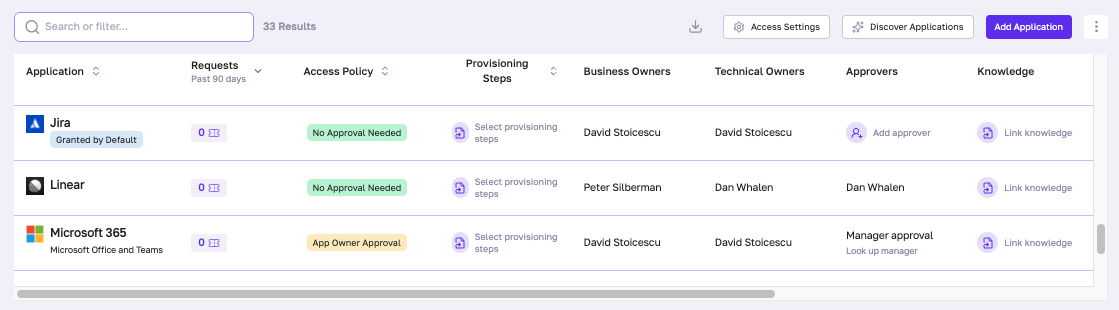
- Lots of folks want to designate apps that are granted in a user's default profile. So we’ve added a “Granted by Default” tag to easily keep track of this.
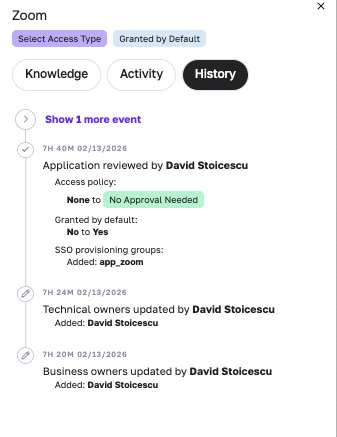
- We’re making it easy to keep the app matrix up to date — yet keeping track of changes is paramount, so we’ve included a history tracker for each application.
Integrations
We shipped improvements across ServiceNow, Slack, Google Workspace, HaloPSA, Jira, and Freshservice this month.
ServiceNow
- Added createTicket skill for programmatic incident creation
- Fixed comment parsing that was causing duplicate content in polled comments
- Fixed assignee/group field mapping in handoff skills
Slack
- Conversation type indicators show DM vs channel vs thread context
- Increased user list pagination from 100 to 500 — supporting orgs with 5K+ users
Google Workspace
- Archive User skill now displays license count before archiving
- New standalone getArchivedUserLicenses skill
HaloPSA
- Enabled email notifications on replies
- Increased polling interval to 3 minutes to prevent rate limiting
- Fixed polling crashes caused by failed inline image downloads
- Smarter triage-out behavior — only escalates tickets actually assigned to Fixify
Okta
- New listAppsWithGroups batch skill for efficient app-group lookups
Jira
- Fixed listWebhooks skill to read from the correct response field
Freshservice
- Poll tickets now gracefully handle deleted conversation authors
- Improved approver field clarity in addApproval skill
Dynamic Skills
- Improved loading experience with background prefetching — no more form UI blocking
Request Handling
It’s easier and faster to find any request by using layered Quick Filters and Search together.
- Choosing a quick filter (e.g. “Hand Off”) applies the matching filter (e.g. Triage Reason: “Hand off”) just like using SearchFilter
- Better performance — Filtering is faster
- Consistent counts — No more mismatches between quick filters and search filters
- Stack filters — You can add or remove more filters on top of a quick filter to narrow results further
That's a wrap for February — a focused month with real impact. Application Management is off to a strong start, integrations got sharper across the board, and finding the right request is now faster than ever. As always, keep the feedback coming — it's what keeps us building the right things.
Related articles
Fixify Service Catalog: The heat map that shows what IT really does all day

.avif)
Help desk automation: 5 game-changers for faster resolutions and happier employees from Fixify's own experience


What is an IT support team structure? Roles and responsibilities explained

Stay in the loop

Sign up to get notified about our latest news and blogs