October 2025 product release

Listen to this blog as a podcast

.avif)
A remix of favorites, features, and smarter workflows
Hard to believe — it’s been two years. Two years of release notes, of celebrating wins big and small, and of sneaking in pop culture love letters to Fast & Furious, Formula One, and last year’s Commanders dominance.
Now we’re kicking off year three, and we’re just as hyped to share what we’ve been building — this time with a little extra flavor.
So, in the immortal words of the great ‘90s rap DJs (I see you, DJ Clue): REMIX!
This month’s release is a mix of greatest hits and new tracks. We’re revisiting some of the biggest features from the past year, while also dropping some fresh updates you won’t want to miss.
In case you missed it …
Over the past month, we dug deeper on a few of the features you may have already read about in other release notes — now with video to bring them to life. We’ve also got a brand-new feature to show off. You can read more and watch the videos below (with more highlights coming soon!).
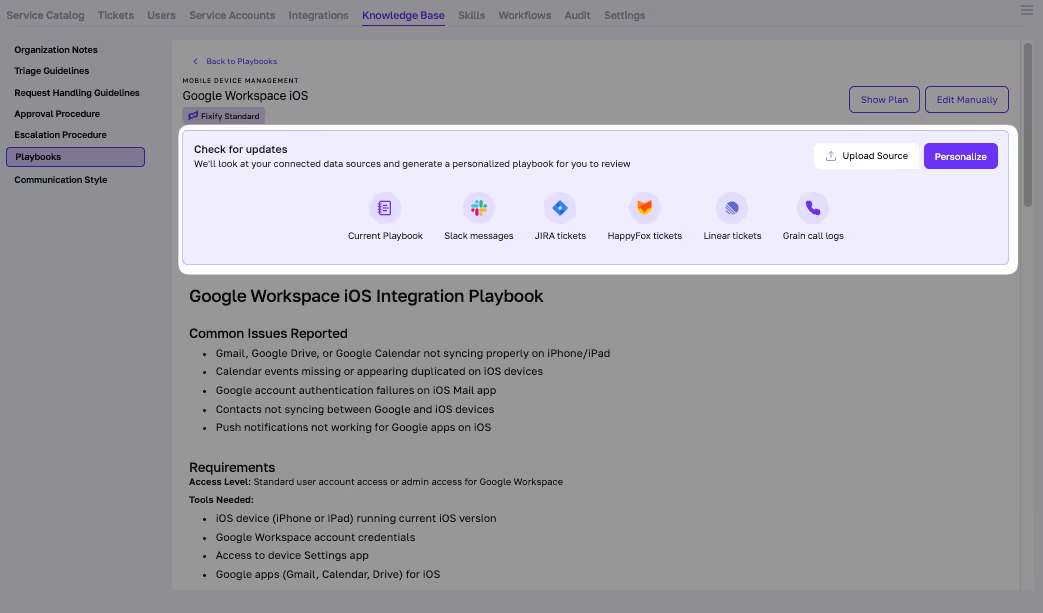
- Announcing Smart Personalized Playbooks: Auto-generate your team’s know-how into living playbooks that stay current. By pulling directly from your real tickets, messages, and call transcripts, they capture how your team actually solves problems and keep those insights fresh as your environment evolves.
- Suggest-a-Playbook: Real-time, context-aware playbook recommendations delivered exactly when they’re needed. When an analyst opens a ticket, Fixify reads the context — category, sentiment, even ticket history — and instantly suggests the right playbook to resolve it faster.
- Fixify Standard Playbooks: A library of prebuilt SOPs and workflows that give you a running start on IT automation. Each playbook captures proven steps for common IT requests — from onboarding to access management — so teams can standardize resolutions and accelerate delivery from day one.
- Ask Sidekicks: Our smart assistant — ready anytime to provide guidance, explanations, or next steps when analysts need it most. Not to replace people, but to bring AI where it actually thrives: in the messy middle, where context and coordination matter most.
The platform experience
Updates across UX, UI, and workflows to make every interaction smoother.
- New ticket counter enhances Service Catalog: We now display total ticket count in the Service Catalog, making it easier to see overall volume for any given time period.
- Global request search: Analysts and customers can now use Ticket Key to search for a Fixify request — a faster way for analysts and customers to find the exact ticket they need.
- New table experience for skill output: We added a slick new way to explore and interact with tabular skill results — designed to help you get the data you need faster than ever.
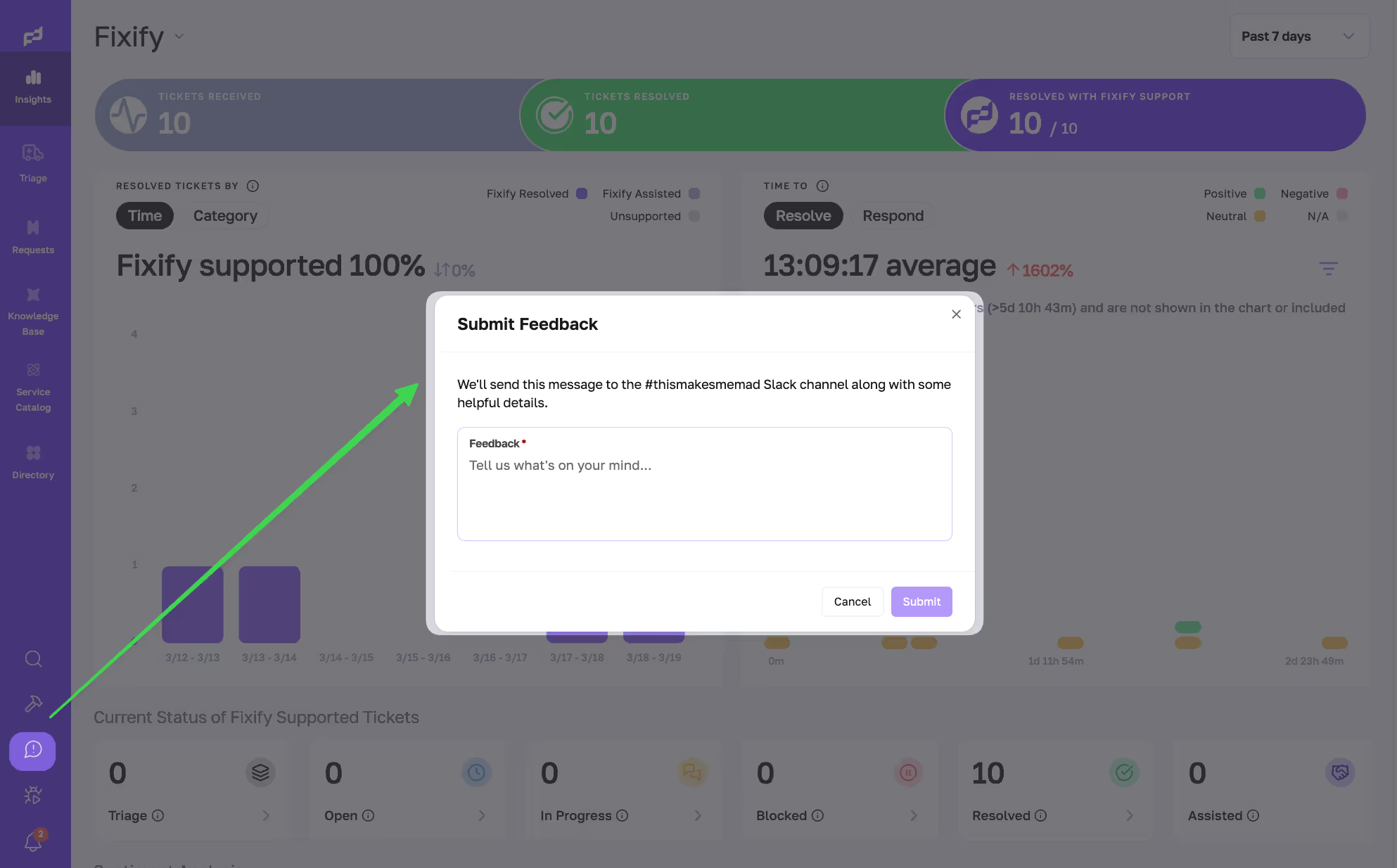
- Instant feedback button for continuous improvement: We added a persistent feedback button in the app. When clicked, it logs a PostHog event flagging that session for review. Since launch, dozens of enhancements — big and small — have been shipped based on user feedback captured this way.
- Enhanced date-time handling to improve user clarity: We updated how Fixify handles date-time fields by adding explicit time-zone support. This change makes time information clearer for users and helps avoid confusion around how dates are displayed. Stay tuned — we’ve got more coming on time zones, because it's a never ending journey!
IT help desk experience
New and improved features for help desk analysts, ticket flows, and agent tools.
- Approvals clearer in ticket sidebar: The “Approvers” field now displays each approver’s name and decision, replacing the previous “NA.”
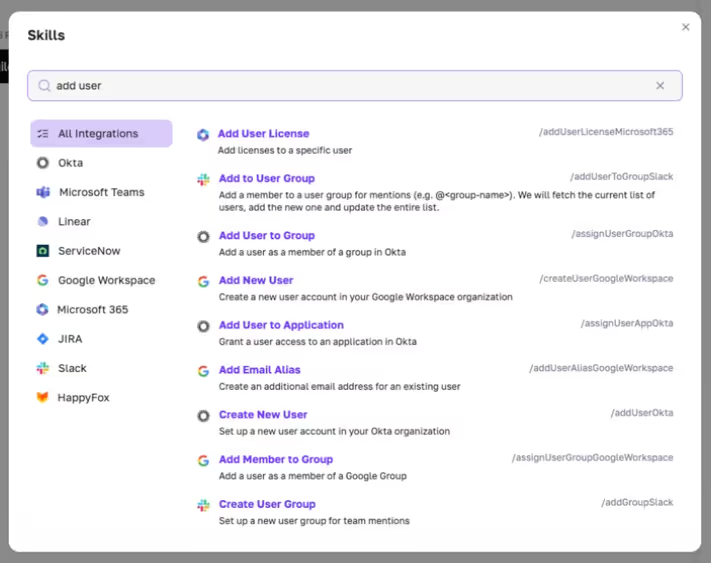
- Enhanced skill search: We completely revamped how analysts find and execute skills — improving both the forward-slash command search and the command + k search dialog. This experience allows for improved search layout and results, searches across the description of the skill, not just the name and provides a way to filter by technology.
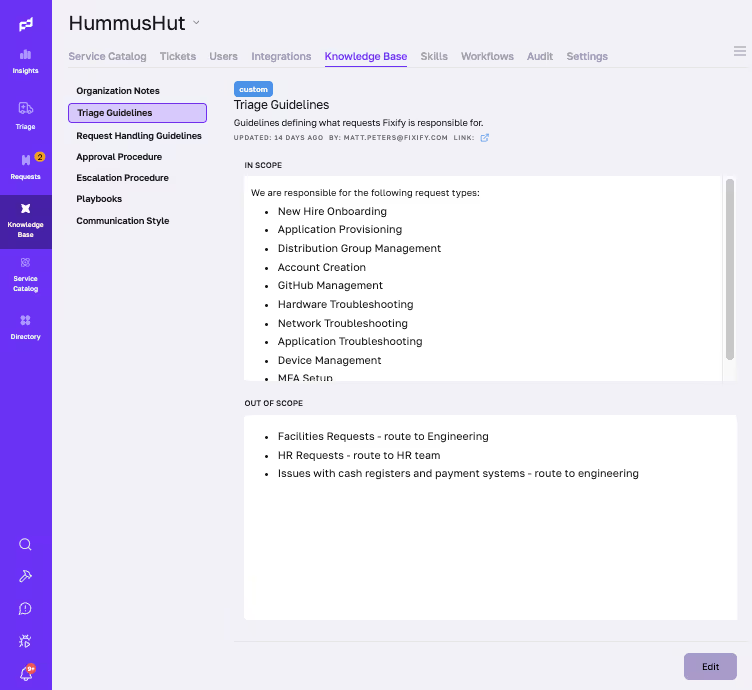
- Triage guidelines: Clearer scope and smoother editing. Analysts can now view triage guidelines directly in the Knowledge Base, with clear “In Scope” and “Out of Scope” sections to speed decision-making. The editor now uses a fixed-height layout for easier scrolling and organization, and we fixed a bug that caused edited guidelines to disappear from the live view.
Knowledge management
Advances in how knowledge is authored, surfaced, and leveraged across Fixify.
- Smart Personalized Playbook: We can now auto-generate personalized playbooks using data from phone calls, tickets, and messages. When you change a process — whether you mention it on a call or update it in your ticket resolution steps — our AI catches it automatically and generates a new playbook for you to review and publish. That way, everyone is always following the most up-to-date process.
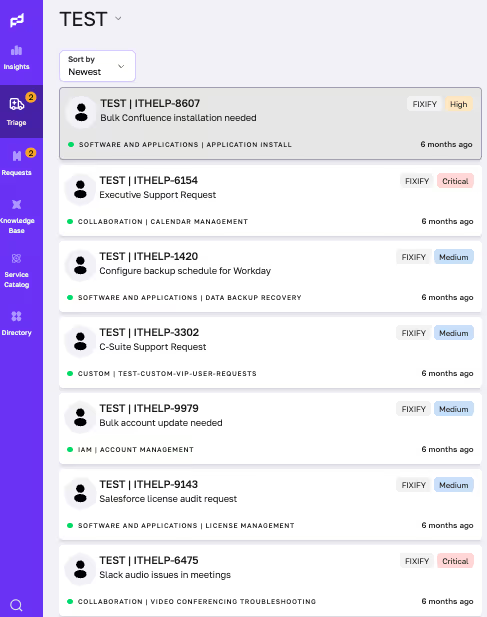
- Priority automatically assigned to requests: We unified priority/severity terminology across UI, API, and data. We now auto assign requests priority based on each customer’s SLA definitions. Analysts can still adjust priority manually, and the model records that feedback to improve future recommendations.
Integrations
Updates on new integrations and skills — plus improvements to the ones already in place.
- Customization update for Fixify Microsoft Teams app: We updated our MS Teams app to allow customer-specific customization — including the ability to change the app’s name and description.
- ServiceNow, Service Catalog support added: The ServiceNow integration now includes Service Catalog items (sc_req_item, sc_task) alongside incidents. We resolved outbound messaging and assignment display issues, updated the priority/impact APIs for the new schema, and refreshed the onboarding docs.
- Skills Update GALORE!: We expanded our skills library for existing integrations — adding over 20+ new skills across four integrations. These skills are automations that run within connected integrations, helping analysts take action faster without leaving Fixify.
- Google Workspace
getTransferInfo: Check the status of an existing data transfertransferUserData: Automatically transfer Drive, and/or Calendar to another usertransferUserDataToManager: Automatically transfer Drive, and/or Calendar to a user's manager, dynamically determing the users manager from Google WorkspacearchiveUser: Archives a user while preserving their data but disabling accessunarchiveUser:Restores a previously archived user's access and dataresetUserPassword: Enabling password reset functionalityremoveUserAllGroups: Removes a user from all Google Groups they belong togetDeviceInfo: Retrieves a device by IDlistUserDevices: Lists all devices for a userwipeDevice: Wipes a device by it's idwipeDeviceUser: Wipes an account from a deviceremoveUserConnectedApps: Disconnect third-party applications from user accountsremoveUserAppPasswords: Remove application-specific passwordsremoveUserRecoveryInfo: Allows clearing both recovery email and recovery phone information from a users account- JAMF
listComputersFileVaultInfo: Collect FileVault encryption status across all managed endpointsgetComputerFileVaultInfo: Retrieve general FileVault status informationgetComputerFileVaultRecoveryKey: Fetch personal recovery keys
- Microsoft
resetUserPassword: Enabling password reset functionalityenableUseranddisableUser: Con trol user login accessupdateUser: Allows modifying a user account detailslistLicenses: List licenses associated with the subscriptionlistUserLicenses: Lists a user’s associated licensesremoveUserLicense: Remove associated license from a user account
- Fresh Service
addApproval: Enables adding approval requests to service ticketslistGroups: Retrieves agent groups
- Google Workspace
Bug fixes and improvements
The usual roundup of bug fixes, performance enhancements, and backend reliability work.
- Device onboarding, simpler inputs and auth options: Device onboarding now supports boolean inputs via checkboxes and multiple authentication methods (OAuth or API key) with a clear selector. Existing single-method flows remain unchanged. This update especially simplifies Okta OAuth onboarding.
- Secondary conversations restored: Analysts can once again start secondary conversations from Request Queues. We resolved a TypeError caused by a new response format.
- Jira message delivery fixed: Comments now post correctly to both Jira and Fixify. The Integration Hub uses the Service Desk endpoint by default, falling back to the issue endpoint when needed.
- Toast notifications fixed: Clicking toast notifications after a request update no longer triggers a 404. Updated URL logic now routes to the correct destination, restoring smooth navigation.
That wraps the first release of year three — a mix of fan favorites, new tools, and improvements shaped directly by your feedback. We’re excited about where the next stretch takes us, and we’ll keep refining the experience every step of the way. If you have ideas, questions, or requests, send them our way. You play a big role in what we build next.
Related articles

Theodore Roosevelt and ChatGPT

.avif)
The future of IT operations is humans + AI (not either/or)
Which IT applications generate the most help desk tickets?

Stay in the loop

Sign up to get notified about our latest news and blogs