%201.avif)
.svg)
Use AI help desk automation to tackle 75% of IT tickets


3 common questions IT teams ask along the AI journey
.avif)
.avif)
.avif)
How much work is it to set up, care and feed the AI tool?
.avif)
Are self-service “ticket deflection” AI tools ready for prime time?
.avif)
With so many new AI tools, where do I start? And what’s the recipe for success?

AI automation you (and your users) can count on
We combine AI with real analysts to take care of your users and get them unstuck – fast (all at a price your CFO will love!)
AI automation you (and your users) can count on
We combine AI with real analysts to take care of your users and get them unstuck — fast (all at a price your CFO will love!)
What you get
.png)
Most AI tools race to close tickets. By keeping people in the loop, we make sure it’s done right.
.avif)
Intelligent ticket categorization
Spot where you’re spending time — and see where you can improve
Intelligent ticket categorization
Our tech combines built-in rules and AI to automatically categorize incoming tickets into 40 use cases — including custom ones you define.
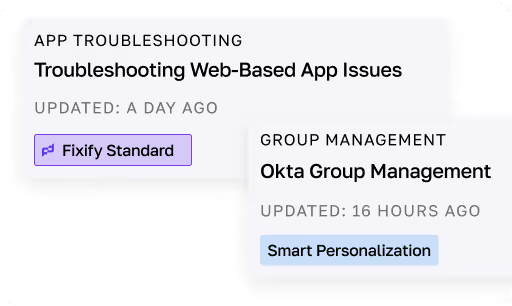
Automated playbook generation
Turn team know-how into consistent workflows that scale
Automated playbook generation
Whether you’re a well documented team or running off tribal knowledge, we turn your workflows into Smart Personalized Playbooks. Our tech automatically generates playbooks from team messages, calls, and tickets — and keeps them up to date as we spot processes change.
.avif)
Personalized support
Put a skip in the step of every user with a connection that’s personal and real
Personalized support
Everyone’s different. That’s why our AI help desk Sidekicks gather context about each user we talk to. It ensures our analysts can tailor every interaction so every user feels like a VIP.
.avif)
Automated context gathering
Untangle tickets crazy fast with Fixify’s AI-enabled help desk
Automated context gathering
Our AI help desk Sidekicks dive into request details — categorizing work, gathering user context and applying intelligent workflows to resolve tickets faster. Our analysts quickly approve the recommendation, closing tickets with precision and speed to get your users back to work.
.avif)
Intelligent workflow automation
5X the number of users you can support with your current help desk team
Intelligent workflow automation
Our AI help desk Sidekicks are built to tackle any ticket volume, helping our analysts diagnose and resolve everything from quick app provisioning to hardware troubleshooting. We’re always learning from past tickets to make smarter recommendations, so we can take on even more as your company grows.

Sentiment analysis
Turn CSAT confusion into clarity with sentiment analysis of every ticket
Sentiment analysis
Wish you had a higher CSAT response rate? Our proprietary sentiment analysis gives you 100% coverage, using large language models (LLMs) to passively monitor user emotions and detect mood shifts — giving you the insights to make sense of your CSAT score and proactively engage users, before they fill out the survey.
.avif)
Automated ticket summaries
Ensure smooth hand-offs and a quick view so you can track what’s going on
Automated ticket summaries
Our automated ticket summarization provides a quick rundown of a ticket’s state and history, making it effortless for analysts to collaborate while giving you instant visibility.
.avif)
Auto-draft responses
Speed up response time with AI-crafted replies, that our analysts fine-tune
Auto-draft responses
Our AI help desk Sidekicks craft messages based on a user’s preferred communication style, so our analysts can quickly connect and reassure that they’re in good hands.
Why choose Fixify's AI help desk

More reliable
Our AI and people are the perfect team
AI isn’t perfect and neither are people. Paired together they catch errors and craft experiences that always hit the mark delivering the outcomes you want at a fraction of the cost of DIY.
More automation
We take on 75% of your work
Why stop at app provisioning and password resets? Our AI automation can help with 75% of your work — including more complex, Tier 2 and 3 issues.
Less AI to manage
We do the heavy lifting for you
Not an AI whiz? Missing the docs? No problem — we’ll build AI workflows that are just right for you, your team and your users. (No AI expertise needed.)


FAQ
How does Fixify's AI help desk automation change the way IT teams work?
Fixify takes the grunt work off IT’s plate by categorizing tickets, spotting problem hotspots and diagnosing root causes, so IT teams can focus on higher-impact project-based work instead of chasing repetitive issues.
Does Fixify's AI automation change how end users interact with the help desk?
Nope! End users keep submitting tickets like they always have, Fixify just works behind the scenes to speed up resolutions and improve the experience for everyone.
How hard is it to set up Fixify's AI automation?
Not hard at all. We’ve put a lot of thought into making it easy to connect to your existing ticketing system. It’s super fast. We also use our AI capabilities to generate playbooks based on conversations we have with you so we can handle any processes that are unique to you.
How much work is required to maintain Fixify's AI help desk automation?
Very little. That’s one of the big benefits. Since we’re managing all of the AI and automation capabilities that work is on us. Fixify keeps improving as we learn from your environment. Plus, we handle updates automatically, so it won’t distract your IT team.
How much does Fixify's AI automation cost?
Our pricing is simple. It’s based on how many employees you have. No pesky add-ons or up-charges. Check out our pricing page for a quick breakdown of costs and options. If you have questions, we’re happy to chat!
What size company is Fixify’s AI automation capability best suited for?
We’re best suited to companies with at least 50 and up to 2000 employees. If you’re outside that range we’re happy to talk and we can discuss if we’d be a good fit.
.avif)
Get a firsthand look at Fixify in action

Schedule time to learn how we can automate your IT workflows to save time and scale your team to reach their full potential.