.svg)
.svg)
November 2025 product release


Listen to this blog as a podcast

.avif)
Knowledge Base upgrades and faster coaching
Halloween might be over, but that K-Pop Demon Hunter energy lingers — sequined jackets, neon hair, all flash backed by real power moves. That’s the vibe behind this month’s Fixify updates: smoother up front, stronger behind the scenes.
- Knowledge base editor upgrades: Embed, resize and align images; pick blocks with type-ahead. Plus, slash-commands now create playbook-pills inline.
- Our AI Sidekick, Coach, gets a revamp: We upgraded our coach Sidekick. It’s now faster, more responsive, and even more helpful.
- Integrations & Skills revamped: From the new Halo PSA plug-in to searchable drop-downs and auto-tracked skill warnings, analysts will now spend less time hunting tabs and more time executing.
- Under-the-hood resilience works: Unified priority fields, retry logic, health checking, and better infrastructure mean fewer ghosts in the machine and smoother operations overall.
While the costumes are back in storage and the candy is slowly disappearing, the vibe lingers: high style, unexpected power, and clear impact. We’ve channelled that same spirit this month — upgrades you’ll see up-front, but built on a foundation of deeper strength.
Platform experience
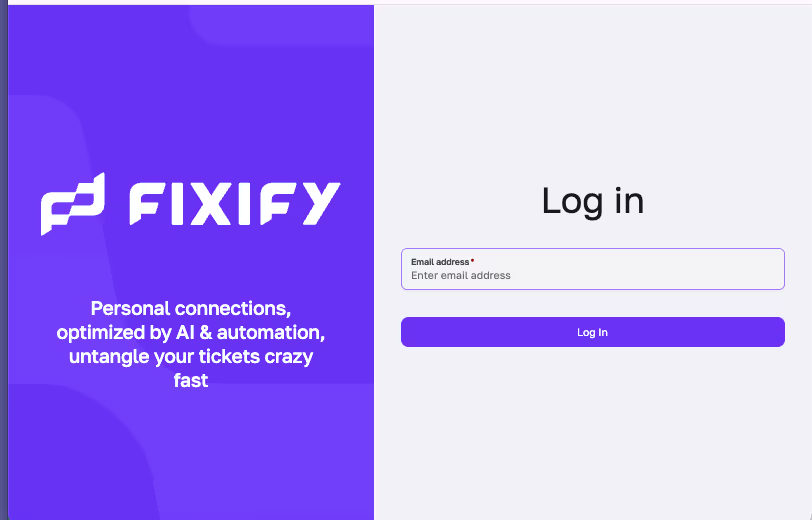
- Fresh Login: The login screen got a refresh with new brand treatment and improved mobile layout.
- Knowledge base editor upgrades: Fixify’s Knowledge Base is a busy place so we’ve enriched the editing experience by adding Images (embed, resize, align, captions), a modern block picker with type-ahead and skill sub-menus that render playbook instructions as inline pills via slash commands.
- Profile visuals put end users front and center in the conversational UI: The conversational UI now displays user profile images alongside names and emails in conversations so there’s a stronger connection to the user on the other side of the ticket.
IT help desk experience
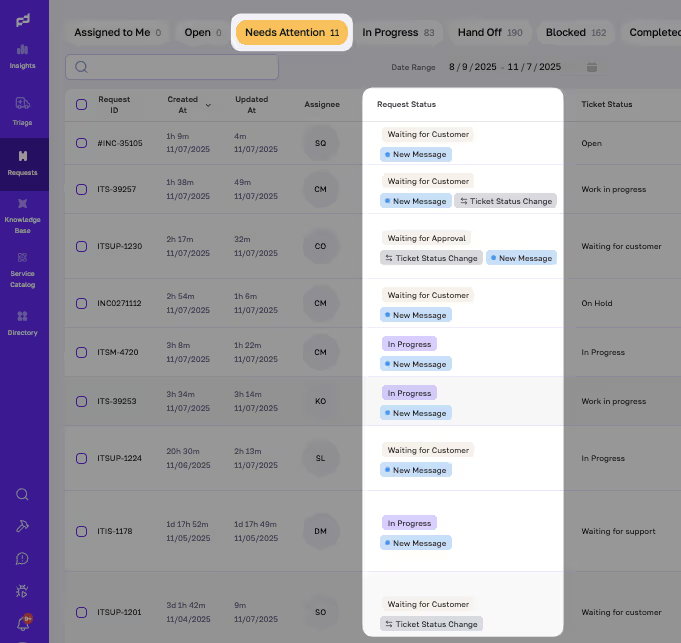
- “Needs Attention” labels: We aim for a speedy back-and-forth conversation with end-users when they submit a ticket. But often users have to step away, jump on a zoom or finish something before they can respond. Now, no matter where or when the end-user responds, their request pops into the Needs Attention queue with a label that explains why it's there.
- Staying focused while staying aware: The conversational UI is where analysts work requests. It’s the heart of the Fixify app. Yet, often analysts also need to see the big picture so they can stay aware of new work that has arrived or is waiting. Our new heads up display ensures analysts stay aware of other work while staying focused on the task at hand.
- Coach Sidekick dishes out faster, smarter guidance when you need it: One of our AI Sidekicks that we affectionately call “Coach,” now responds even faster. It offers up real-time suggestions while analysts craft replies. The updated interface lets analysts draft and send responses to end users at any point in the request, keeping conversations flowing without interruption.
Knowledge management
- We’ve improved the Knowledge Base with clearer guidance for verification and triage workflows. Plus, we’ve optimized our Smart Personalized playbook with improved navigation & new checks that ensure the feature is reliably personalizing playbooks.
Integrations
Updates on new integrations and skills — plus improvements to the ones already in place.
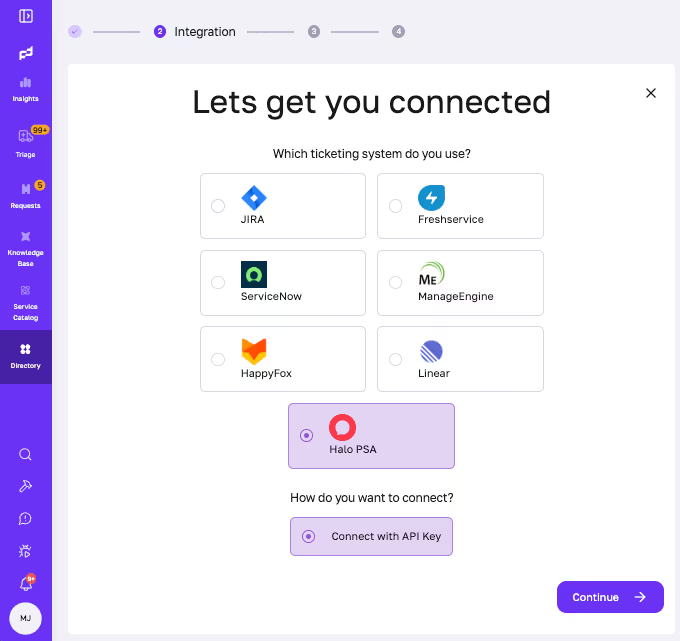
- We’re excited to welcome customers on Halo PSA. This new integration ships with Ticket Management, Messaging, and User Management. It’s also fully wired into the Conversational UI with 17 ready-to-run skills. Faster onboarding, less tab-hopping.
- Searchable drop-downs Skills can now inform the UI to display searchable dropdowns. They’ve been extended to all ticketing systems that have skills such as assignTicket, addRequestParticipant, and removeRequestParticipant.
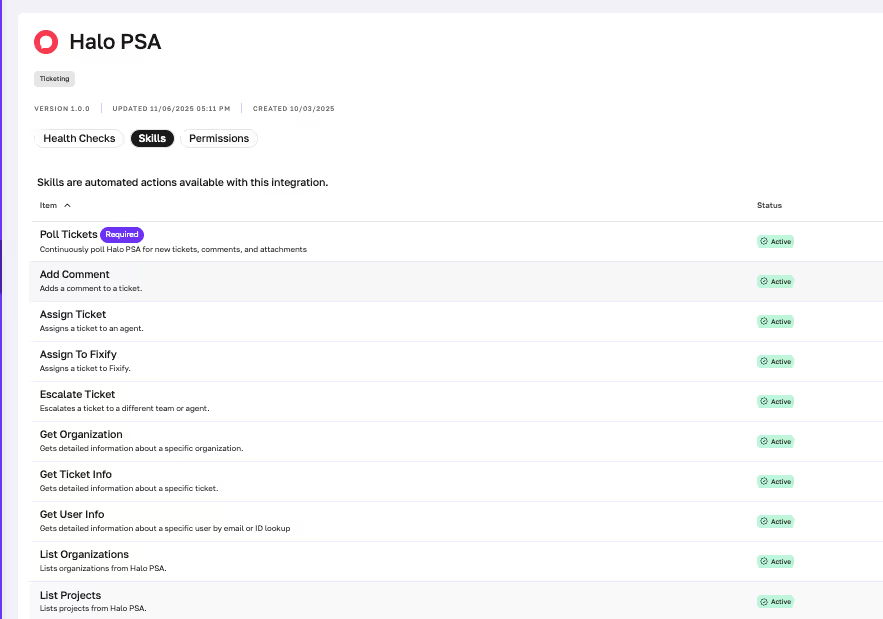
- Organizing Skills and Warnings: We’ve enhanced our Integration SDK to give teams more control and visibility into how skills operate. The SDK now automatically tracks which type of operation each skill performs: create, read, update, or delete. This foundation makes it easier to apply fine-grained policies in the future, such as restricting or approving certain actions based on their impact.
This update also introduces a new capability to define and display warnings when specific skills are used, helping teams make safer and more informed decisions during use.
- Okta & Fixify integration now has a smoother handshake and healthier integration: Connecting Okta to Fixify just got easier. We improved the handshake between systems to handle edge cases that used to create hiccups during setup (think inconsistent key formats or rate limits). The result: faster onboarding and more reliable authentication. Health checks now run sequentially with short pauses to avoid rate limiting, improving integration reliability.
- Slack installation flow is clearer and observable: Installing or reconnecting Fixify in Slack is now a breeze. The setup flow gives clearer feedback, handles edge cases automatically, and adds observability under the hood so both admins and developers can see what’s happening when it happens.
- Freshservice core bug fixes and improved task handling: We’ve resolved issues with ticket assignments, status updates, and visibility so day-to-day work is smoother for teams using Freshservice. Sub-task support is live in testing and coming soon, along with improvements to API handling that will make automation even more reliable.
- Skill updates:
- Slack
- We’ve made the Slack skills more forgiving by allowing for hash signs, or channel ids in common fields where we saw users misplacing the inputs
getUserPhoto: Will retrieve the photo of the slack user, useful when doing user identity verification checks
- Microsoft 365
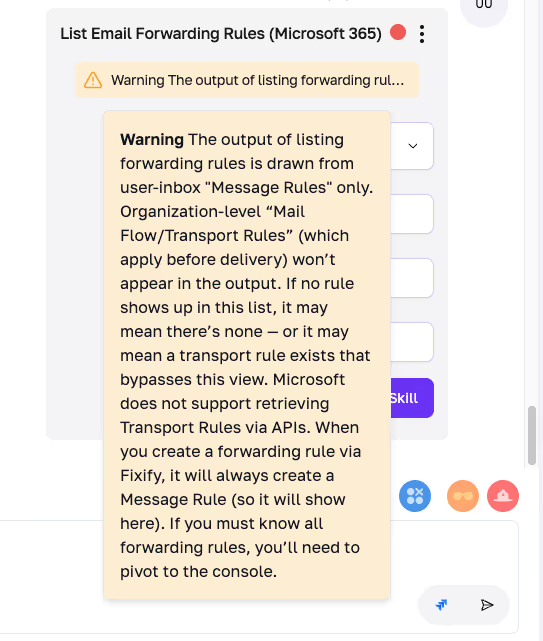
getUserPhoto: Will retrieve the photo of the user, useful when doing user identity verification checkslistEmailForwardingRules: Lists any email forwarding rules for a given users inboxaddEmailForwardingRule: Makes it simple to setup an email forwarding rule from one user to anotherremoveEmailForwardingRule: Deletes a forwarding rule
- Jira
- Smart participant selection:
removeRequestParticipantshows only current participants instead of all users - Simplified participant operations: Changed
addRequestParticipantandremoveRequestParticipantfrom array-based accountIds to single user accountId - Added API support: Implemented g
etAssignableUsers()and listRequestParticipants()methods in JIRAClient
- Smart participant selection:
- Slack
Bugs fixes and improvements
- Screenshots now render reliably in-product: PNGs were previously stored with the wrong MIME type, which corrupted image data from the artifacts API. We corrected metadata to image/png, so screenshots load directly in Fixify—no more pivoting to external tools.
- Notifications behave as expected: Sounds play only for new or reopened requests (not on playbook updates).
- Fewer forced logouts: Insider sessions now persist across IP changes.
- Navigation is steadier. Resolved intermittent “Failed to fetch” errors and improved retry behavior for left-nav counts.
- Request queue stability: Fixed runtime crashes tied to missing objects during task preparation and preserved original API status codes.
- Smoother room presence: Corrected join/update behavior and added resilient retry logic to reduce fetch errors.
- Fair message loading: Isolated queues by org so one tenant can’t slow others.
- Better PDF/OCR results: Per-page raw text is now returned, and page DPI increased to 300 for clearer extraction.
- Consistent views: “Requests” and “Open queue” now align on date filters so both show the same tickets.
- Cleaner timelines: End-user reply timestamps now ignore only internal comments (not all automated messages), improving first-response and follow-up metrics.
- Fewer false alerts: Closed-ticket labels no longer trigger stray “new message” flags.
- Unified priority: Replaced “urgency” with a single priority field, with data backfilled and synced to analytics.
- More resilient platform: Improved health checks (services report “ready” only when dependencies are up), standardized retry behavior in key services, and strengthened event processing with safer concurrency and backoff.
- Infrastructure hardening: Added database proxying, standardized dependencies, updated runtimes, and improved build/deploy pipelines to reduce errors and improve observability.
That’s a wrap for this month — upgrades that look good on the surface and hit even harder underneath. From a more capable editor to a sharper Coach and expanded integrations, everything here is built to keep analysts moving fast and confidently. As always, your input shapes what comes next, so keep the feedback coming. We’re already working on the next round of improvements.
Related articles

Pros and cons of outsourcing IT support: Is it right for your business?

The importance of IT asset management (and how to do it better)

What is IT automation in 2025 and where is it headed?

Stay in the loop

Sign up to get notified about our latest news and blogs